Self-hosting and production
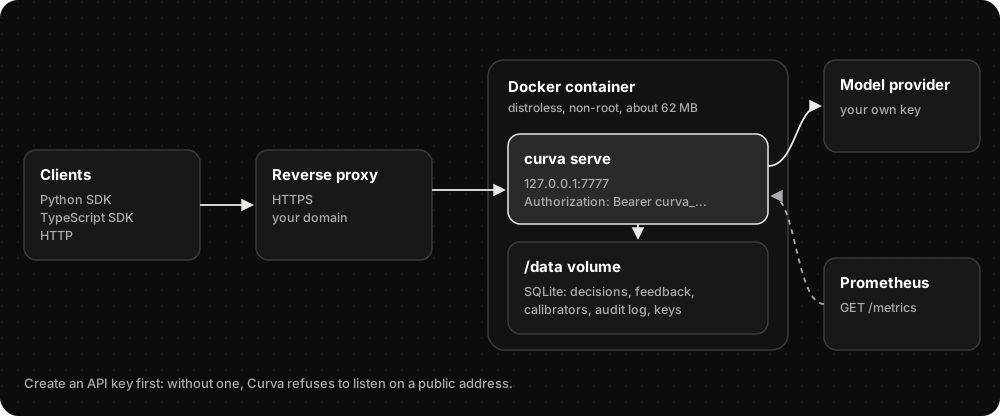
Curva is one binary with an embedded SQLite database. It runs anywhere Docker runs; a small VPS is enough.
Docker
Section titled “Docker”A release publishes ghcr.io/itsmohitrohilla/curva for amd64 and arm64: a distroless, non-root
image of about 62 MB with its data in the /data volume.
1. Create an API key. Without one, Curva refuses to listen on a public address.
docker run --rm -v curva-data:/data ghcr.io/itsmohitrohilla/curva keys create --name prodIt prints the key (curva_…) once. Save it in your password manager.
2. Start the server.
docker run -d --restart unless-stopped --name curva \ -p 127.0.0.1:7777:7777 -v curva-data:/data \ -e OPENROUTER_API_KEY=sk-or-v1-... \ ghcr.io/itsmohitrohilla/curva3. Add HTTPS with a reverse proxy.
4. Use it.
export CURVA_BASE_URL=https://api.example.com CURVA_API_KEY=curva_...python -c "from curva import Curva; print(Curva().health())"The database (decisions, feedback, calibrators, audit log, keys) lives in the curva-data
volume: back it up. docker stop shuts down gracefully: requests in flight are answered (with a
30 s grace period), then the server exits.
API keys
Section titled “API keys”curva keys create --name ci --rpm 600 # printed once, stored as a SHA-256 hashcurva keys listcurva keys revoke <id> # takes effect immediatelyIn Docker: docker exec curva /curva keys revoke <id> --db /data/curva.db.
- Once any key exists, every route except
/healthneedsAuthorization: Bearer curva_…. The Python SDK sendsCURVA_API_KEYautomatically. - Each key has its own requests-per-minute limit (
--rpm, default 600, bursts up to 10 seconds’ worth). - Every 429 carries
Retry-After: the key’s wait, the provider’s, or the seconds until the daily budget resets at 00:00 UTC. - Bind safety: with no keys,
curva serverefuses any non-localhost address unless started with--no-auth(only for a trusted private network). - A server started without keys stays open until restarted, so restart it after creating the first key.
Per-project provider keys
Section titled “Per-project provider keys”A project can pay for its own model calls with its own provider key:
printf %s "$KEY" | curva project-key set support # read from stdin, never shell historycurva project-key remove supportKeys are encrypted at rest with AES-256-GCM under CURVA_MASTER_KEY (64 hex characters, e.g.
from openssl rand -hex 32) and bound to their project. Keep the master key safe: without it,
stored keys can’t be read, and the server refuses to start if project keys exist but the master
key is missing.
Audit log
Section titled “Audit log”Every decision is recorded with its id, project, API key id, a salted hash of the state (never the state itself), model, mode, config, privacy setting, answers, latency, cost and whether it was cached.
curl -H "Authorization: Bearer $CURVA_API_KEY" "https://api.example.com/v1/audit?project=support&limit=100"Pages are ordered newest first; pass next_before as before to continue. From Python:
client.audit(project="support").
Privacy
Section titled “Privacy”- The state is never stored. The audit log keeps only a hash of it.
privacy: "strict"on a request routes the model call only to providers that neither store nor train on prompts.- Provider error details stay in the server log and are never sent to callers.
Metrics
Section titled “Metrics”GET /metrics serves Prometheus text:
| Metric | Meaning |
|---|---|
curva_decisions_total |
Decisions answered |
curva_cache_hits_total |
Decisions served from the cache |
curva_answers_total |
Individual answers |
curva_abstains_total |
Answers below min_confidence |
curva_decide_duration_seconds |
Latency histogram |
curva_http_responses_total{status} |
Responses by status (502 = provider errors) |
curva_daily_quota_remaining |
Model calls left today, with CURVA_DAILY_LIMIT |
Logging
Section titled “Logging”The server logs to stderr, one line per request (method, path, status, latency, request id, API
key id and decision id), plus its startup configuration, warnings (such as running without API
keys), and provider and internal errors. Under Docker, read them with docker logs curva.
CURVA_LOG=jsonwrites JSON lines for a log pipeline (default: human-readable).CURVA_LOG_LEVELis aRUST_LOG-style filter (defaultinfo).- Every response carries an
x-request-idheader. Send your own (1–64 visible ASCII characters) to follow a request across services, or let the server generate one. The SDKs expose it asrequest_id/requestId.
Reverse proxy
Section titled “Reverse proxy”Curva speaks plain HTTP. On the public internet, put it behind a reverse proxy (Caddy, nginx or a cloud load balancer) for TLS and protection against slow clients. With Caddy, after pointing a domain at the server:
caddy reverse-proxy --from api.example.com --to localhost:7777Caddy gets the certificate itself; only ports 80 and 443 need to be open.
Built-in limits: request bodies up to 16 MB (--max-body-mb), a 120 s deadline per request, at most 64 model calls
per request, and a 60 s timeout per provider call.
Environment variables
Section titled “Environment variables”| Variable | Used by | Meaning |
|---|---|---|
OPENROUTER_API_KEY |
server | Provider key for model calls |
CURVA_PROVIDER_URL |
server | Any OpenAI-compatible endpoint (default OpenRouter) |
OPENAI_API_KEY, ANTHROPIC_API_KEY, GEMINI_API_KEY, … |
server | Turn on that provider for @<provider>/<model> ids; see Providers |
CURVA_PROVIDER_<NAME>_URL / _KEY / _RPM |
server | Any other OpenAI-compatible provider, including your own fine-tuned model (Providers) |
CURVA_RPM |
server | Requests per minute to the provider (free OpenRouter keys allow 20) |
CURVA_DAILY_LIMIT |
server | Cap on model calls per UTC day; further requests get 429 |
CURVA_MASTER_KEY |
server | 64 hex characters; encrypts per-project provider keys |
CURVA_LOG |
server | json for JSON log lines |
CURVA_LOG_LEVEL |
server | Log filter, e.g. info (default) or debug |
CURVA_BASE_URL |
SDK | The Curva server (default http://localhost:7777) |
CURVA_API_KEY |
SDK, curva mcp |
The Curva API key to send |
Performance
Section titled “Performance”Curva’s own overhead is small next to model latency:
| Load (release build, SQLite on disk, auth, audit and metrics on) | Result |
|---|---|
| 500 req/s for 10 s | p50 0.59 ms, p99 2–3.5 ms |
| Saturated | about 8,000 req/s on a laptop |
Model latency on free providers is about 0.5–3 s per decision. Repeat decisions come from the cache.
A single server serves one tenant. For several isolated customers, run one server each.


Documentation for everything Tarkova makes.
© 2026 Tarkova Private Limited.